
How to Link Pension Records for Retired Parents in Family ID
If your parents are retired and receiving a pension, linking their Pension Records for Retired Parents to your PPP Family ID(also known as Parivar Pehchan Patra or PPP Family ID) makes it easier to manage government benefits without repeating paperwork.
This guide explains what it means, why it’s useful, and exactly how to do it step by step in plain, simple language.
What Is PPP Family ID?
Family ID is an 8‑digit family identifier created by the government to store verified details about your whole family — like members, income, address, and relations. This helps the government match your data with welfare schemes like pensions, old‑age support and other benefits automatically.
Once your parents’ details are part of your Family ID, departments can easily check their eligibility using the same system without extra applications.
Why Link Pension Records for Retired Parents Matters
When pension details are linked to Family ID:
Because Family ID connects to official databases, it reduces delays and simplifies benefit delivery.
Documents Required to Link Pension Records in Family ID
To link pension records for retired parents to the Family ID, the following documents are required:
These documents are critical for ensuring the successful linking of pension records and avoiding any delays in processing.
How to Check Family ID Status Online
You can check the status of your PPP Family ID and linked pension records online by following these steps:
Visit the PPP Family ID Portal: Open the official PPP Family ID portal or app.
Login Using Your Credentials: Enter your Family ID number or Aadhaar number and proceed to login.
Verify OTP: An OTP will be sent to the registered mobile number. Enter it to access the account.
Check the Status: Navigate to the “Pension Records” or “Link Status” section to see if the records have been successfully linked.
Contact Support if Needed: If there is any discrepancy or delay, you can file a grievance through the portal.
This online check ensures transparency and allows you to track the progress of your updates without visiting the department physically.
Eligibility Criteria for Linking Pension Records
To link pension records to your Family ID, the following eligibility criteria must be met:
Parents Must Be Part of the Family ID: Your parents should already be registered in your Family ID.
They don’t already appear as pension beneficiaries in Family ID.
Aadhaar Must Be Linked: The Aadhaar numbers of your parents must be linked to both the pension account and Family ID for smooth verification.
Ensuring these conditions are met will help speed up the process and avoid unnecessary complications.
Who Needs to Link Pension Records
You should link Pension Records for Retired Parents if:
Your parents are retired and receiving state or welfare pension.
They don’t already appear as pension beneficiaries in Family ID.
You want to avoid repeated document submission for each benefit.
Linking ensures their eligibility shows up whenever they apply for related services. Also, Family ID helps disabled members access government benefits quickly and easily.
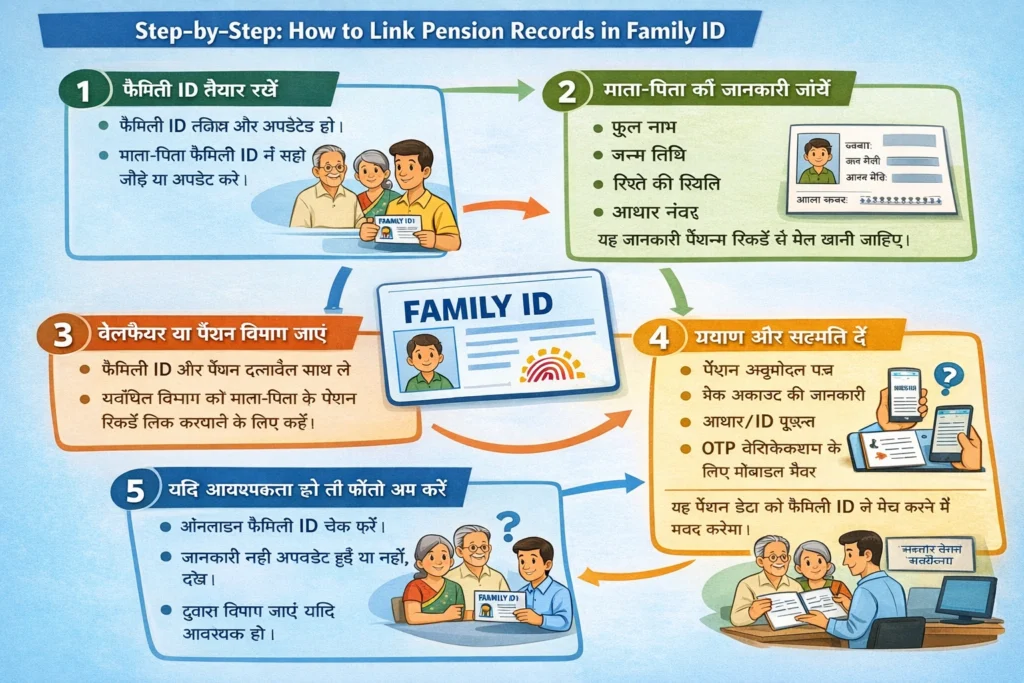
Step‑by‑Step: How to Link Pension Records in Family ID
Get Your Family ID Ready
First, make sure your Family ID is active and updated. If your parents are already part of the same family group in the system, it’s easier to link pension records. If not, update or add them using the update options.
Verify Your Parents’ Details
Check that your parents are listed in Family ID with correct:
1.Full names
2.Date of birth
3.Relationship status
4.adhaar numbers
These details must match their pension account records.
Visit the Welfare or Pension Department
Take your Family ID and pension documents to the relevant department (like Social Welfare Office or Pension Office). Tell them you want your parents’ pension records linked with their Family ID.
Provide Proof and Consent
They may ask for:
1.Pension approval letters
2.Bank account details
3.Aadhaar or ID proofs
3.Mobile number for OTP verification
This helps the system match pension data with the Family ID database.
Follow Up If Needed
If the link doesn’t reflect immediately:
1.Check the Family ID online
2.Confirm that all details were accurately updated
3.Visit the department again if needed
Benefits of Linking Pension Records to Family ID
Linking pension records to your Family ID has several advantages:
Faster Benefit Processing: Once pension records are linked, the eligibility check becomes automatic, and benefits are delivered without delays.
Reduced Paperwork: You won’t have to fill out repetitive forms for every benefit claim. Once the details are updated in the Family ID, the system automatically checks eligibility.
Centralized Data Management: All your family’s government-related records are stored in one place, making updates and access simpler and more efficient.
Better Access to Welfare Schemes: Linking ensures that your parents can easily access pension benefits, medical support, and other government services that they are eligible for.
This process streamlines the entire system and ensures your parents can quickly benefit from available government schemes.
Simple Tips to Make Linking Easier
Make sure your parents’ Aadhaar, bank account, and mobile numbers are updated in the Family ID system. If they’re missing or different, linking may fail or be delayed.
Also, keep copies of all pension letters and any updates you make online or offline. This helps when officials ask for proof.
Common Situations You Might Face
If the system doesn’t show pension eligibility, it might be because:
In such cases, verify the details carefully and request an assisted update from your local service center.
Frequently Asked Questions
Final Thoughts
Link Pension Records for Retired Parents to your Family ID makes future benefit claims and updates smooth and stress‑free. It saves time, avoids repeated forms, and lets departments use one trusted source of data.


