
How to Get Help at CSC or Saral Kendra for Family ID in 2026
If you need help at CSC or Saral Kendra for your PPP Family ID (Parivar Pehchan Patra) in Haryana — whether it’s errors, updates, deactivation, or other issues — visiting your nearest Common Service Centre (CSC) or Saral Kendra is often one of the easiest and fastest solutions.
These centres are set up so that everyone can get hands‑on help with digital government processes, especially if the online portal is confusing or not working as expected.
What CSC and Saral Kendra Are
CSC (Common Service Centre) and Saral Kendra are government‑supported service points located in villages, towns, and cities across Haryana. They Help at CSC people with many government services, including:
Applying for or updating PPP Family ID
Fixing errors in Family ID data
Printing or downloading your Family ID
Verifying family details on your behalf
These centres often have trained operators who know the system and can Help at CSC you complete tasks that are difficult to do online.
Documents Required at CSC or Saral Kendra for Family ID Help
If you’re visiting a CSC or Saral Kendra for assistance with your Family ID, here’s what you generally need to bring:
Aadhaar Card: This is a primary document for verification.
Existing Family ID Number: If available, provide it for faster processing.
Mobile Phone Linked to Family ID: Ensure you bring your mobile number that’s linked to your Family ID.
Proof of Family Relationship: Documents such as a family certificate or birth certificate may be required to verify the family details.
It’s always a good idea to carry clear photocopies of these documents for a smoother process.
How to Find the Nearest CSC or Saral Kendra
Finding the nearest CSC or Saral Kendra is relatively simple:
Ask Locally: Most villages and towns in Haryana have a CSC or Saral Kendra. You can ask local residents or check with your community for the closest location.
Check Online: Some online portals may provide a list or map of nearby CSCs and Saral Kendras. You can search for them on local government websites or through community portals.
Fees for Family ID Services at CSC or Saral Kendra
While government services at CSCs or Saral Kendras are generally free, there may be a small service fee for certain tasks:
You may need to pay a small fee if you want a printed copy of your Family ID or assistance with downloading it.
In some cases, if you need extra help (e.g., entering complex data), a nominal fee may be charged.
Always confirm the exact charges with the operator before proceeding.
Why You Should Use a CSC / Saral Kendra
Here’s why going to a CSC or Saral Kendra often works better than doing everything online:
✔ Live support: A real person can guide you through each step
✔ Fewer errors: Operators know common issues and how to avoid them
✔ Assisted updates: They can enter information for you
✔ No need for tech skills: You don’t need to navigate complex sites yourself
If you’re ever stuck on the portal or the helpline isn’t responding, CSC and Saral Kendra are your best backup. And Also, If your Family ID address does not match Aadhaar, you can correct it online by following a simple update process.
How CSC Helps With PPP Family ID Issues
At a CSC or Saral Kendra, operators can Help at CSC you with:
1.Take your family details
2.Enter them into the system
3.Help generate your unique ID
This is especially useful if online Family ID registration hasn’t been done yet.
- Enter the correct information
- Submit your request
- Help you verify it properly
This assisted mode is often easier than trying to fix it yourself online.
If you want a physical or downloadable copy of your Family ID card, CSC staff can help you print it or save it on your phone.
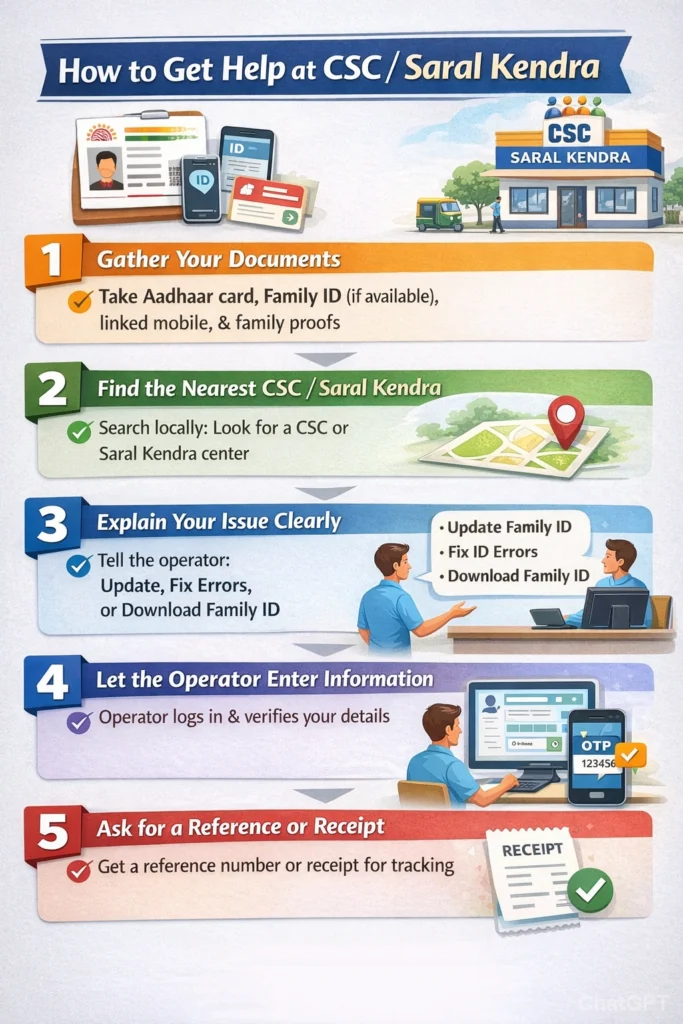
Step‑by‑Step: How to Get Help at CSC / Saral Kendra
Here’s how to make the most of your visit:
Gather Your Documents
Bring the following:
1.Your Aadhaar card
2.Any existing Family ID number (if available)
3.Mobile phone linked to your ID
4.Proofs of family relationship (family certificate, birth certificate, etc.)
Good documentation makes the process smoother and faster.
Find the Nearest CSC or Saral Kendra
You can ask locally — most villages and small towns have one. These centres are usually easy to spot and marked as CSC or Saral Kendra.
Explain Your Issue Clearly
Tell the operator exactly what you need Help at CSC with:
1.“I want to update my Family ID details”
2.“My Family ID is showing an error”
3.“I want to download my Family ID”
Being clear helps them help you faster.
Let the Operator Enter the Information
The operator will:
1.Log into the PPP Family ID system
2.Enter and verify your details
3.Send and verify OTPs (One‑Time Passwords) on your phone
4.Submit your request or download the family ID
Ask for a Reference or Receipt
Once done, some centres will give you a reference number or receipt. Keep this safe — it helps track your request later.
How Long Family ID Updates Take After Visiting CSC
After visiting a CSC or Saral Kendra and submitting your request:
Verification Process: Your Family ID update will be sent for verification.
Processing Time: Depending on the workload, your updates may take a few days. Typically, once verified, changes will appear on the portal, and you can download or print your Family ID.
If you don’t see immediate changes, it’s recommended to follow up with the CSC or Saral Kendra for status updates.
Tips to Make Your CSC Visit Better
These small tips can save time and ensure your request is processed correctly.
Common Issues CSC Can Fix
Here are issues CSC usually solves quickly:
Because the operator enters the info behind the scenes, you often avoid the errors that happen when doing it yourself.
What Happens After You Get Help at CSC
Once the operator submits the changes:
Your Family ID update is sent for verification
You might receive confirmation messages on your phone
After verification, your changes appear on the portal
You can then download or print your Family ID
Often, the process is finished within a few days depending on the workload.
Quick FAQs
Summary:
Visiting a CSC or Saral Kendra for help with PPP Family ID issues is one of the best ways to avoid portal errors, slow responses, or confusion. Operators there are trained to provide help at CSC and make the entire process much smoother, especially if you’re not comfortable using online systems.
Just gather your documents, clearly explain your issue while seeking help at CSC, and follow the steps with the operator — you’ll likely walk out with your Family ID problem resolved.


