
UP Family ID – Registration, Login, Updates & Benefits Guide
The UP Family ID, also known as Parivar Pehchan Patra, is a government initiative aimed at simplifying access to government services and benefits. It assigns a unique 12-digit identification number to every household in Uttar Pradesh, ensuring better governance, transparency, and targeted delivery of welfare schemes. This guide covers everything about the registration process, how to track your application, update details, and access various government services using UP Family ID.
What is UP Family ID?
UP Family ID is a household-level unique identification system introduced by the Uttar Pradesh government. It consolidates family data from various government databases like Aadhaar and ration cards, creating a centralized platform to access benefits such as pensions, subsidies, housing schemes, and more.
Key Features of UP Family ID
Unique Household Identification: Each household is assigned a 12-digit UP Family ID, acting as the central reference for all family-related government services.
Integration with Welfare Schemes: Automatically checks eligibility for government schemes and reduces errors in data processing.
Enhanced Transparency: Ensures that resources and benefits reach eligible households without delays.
Who Should Register for UP Family ID?
Documents Required for Registration
(for all family members)
(linked to Aadhaar for OTP verification)
(e.g., electricity bill, water bill)
(if applicable)
(e.g., marriage or birth certificates, caste certificates)
How to Register for UP Family ID Online
Follow these steps to register online:
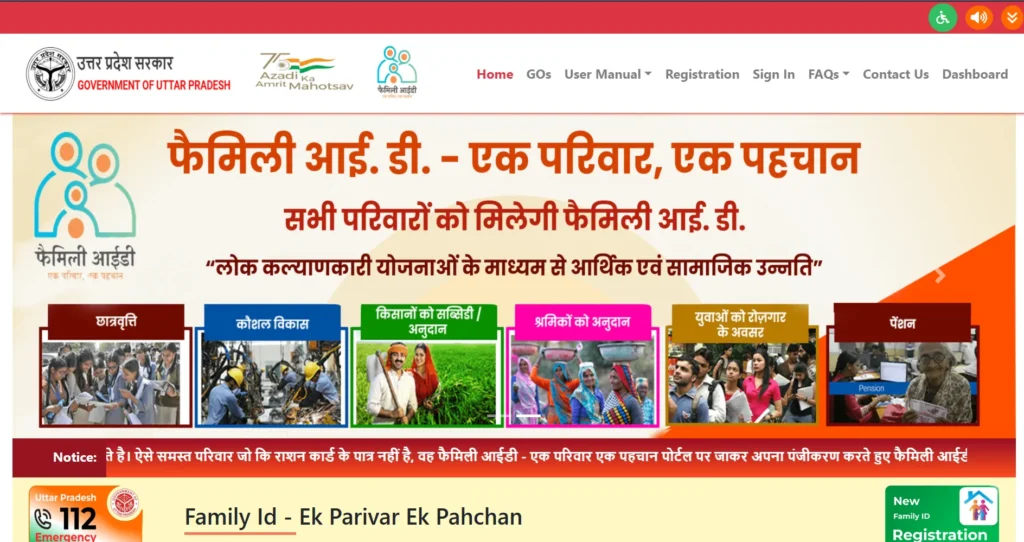
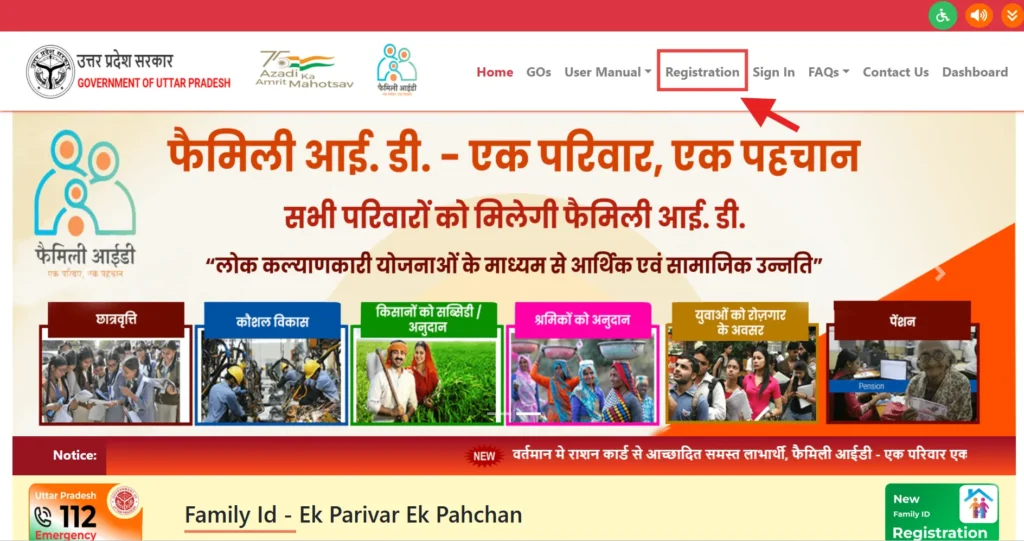
Visit the Official Portal: Go to the official UP Family ID website.
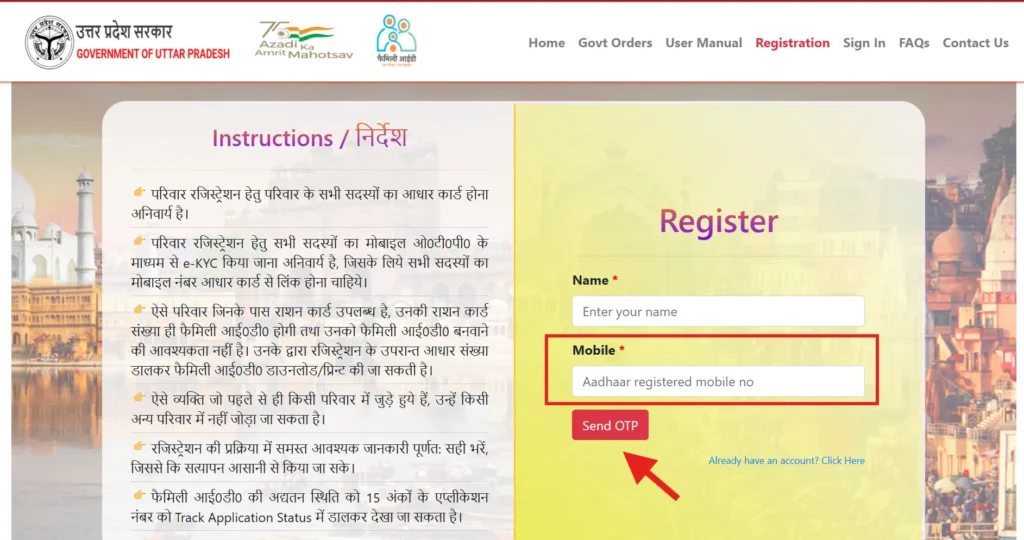
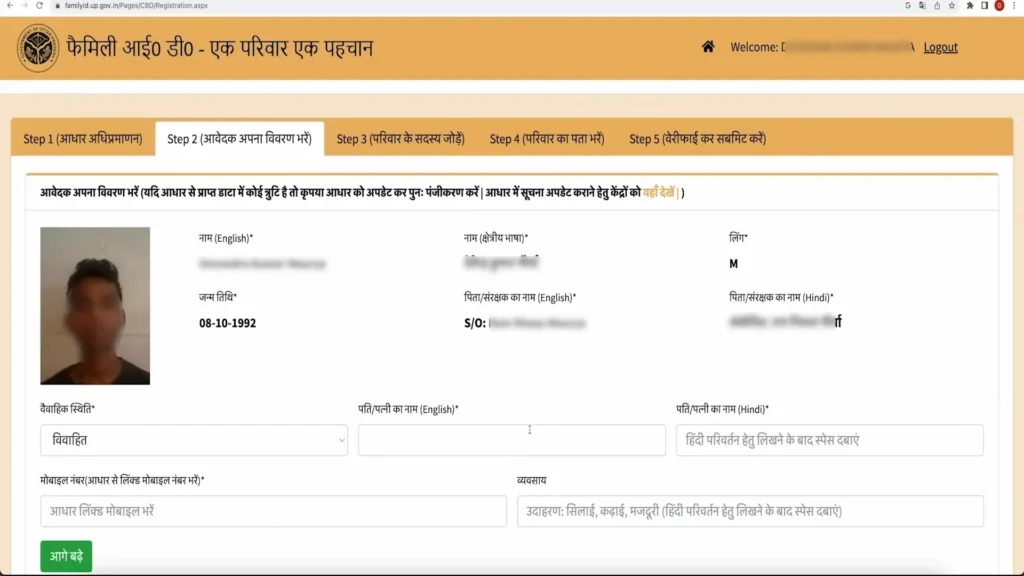
Enter Family Details: Input your family details, Aadhaar numbers, and income details.
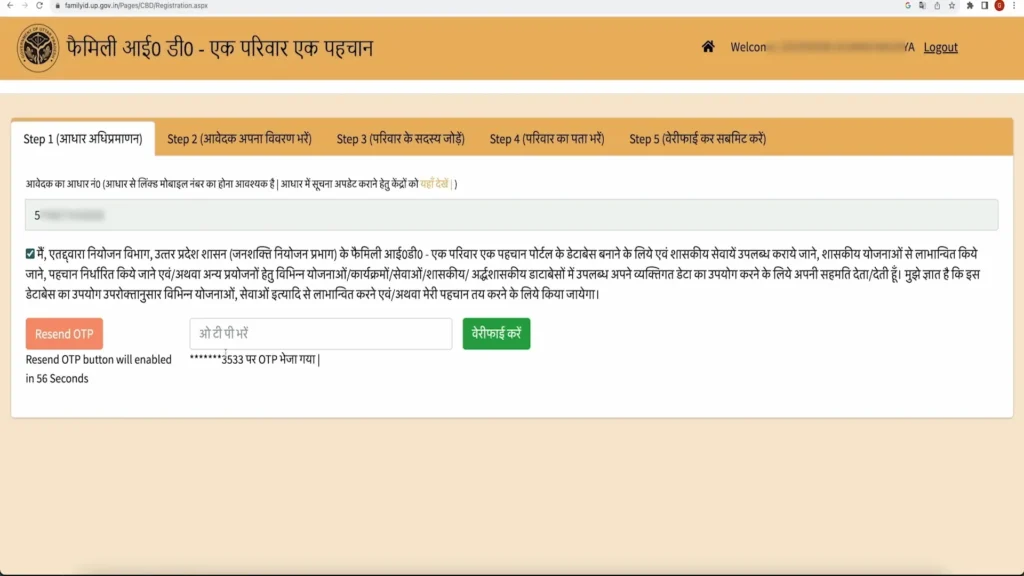
Verify Mobile Number: Receive and enter the OTP sent to your registered mobile number for verification.
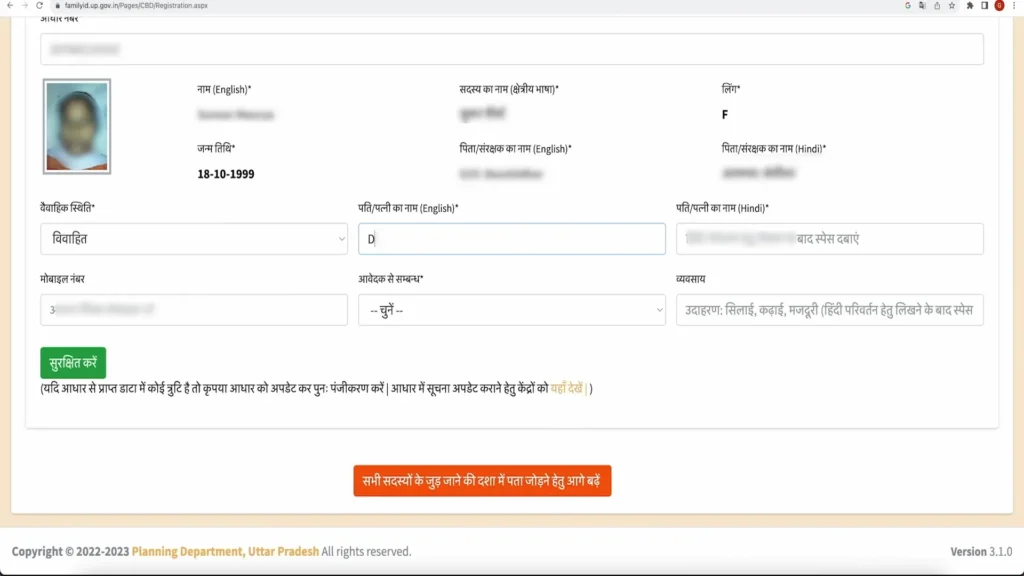
Submit Family Information: Provide complete family member details including name, gender, relationship with the head of the family, and educational information.
Upload Documents: Ensure that you scan and upload the required documents (Aadhaar cards, proof of residence, income certificate, etc.).
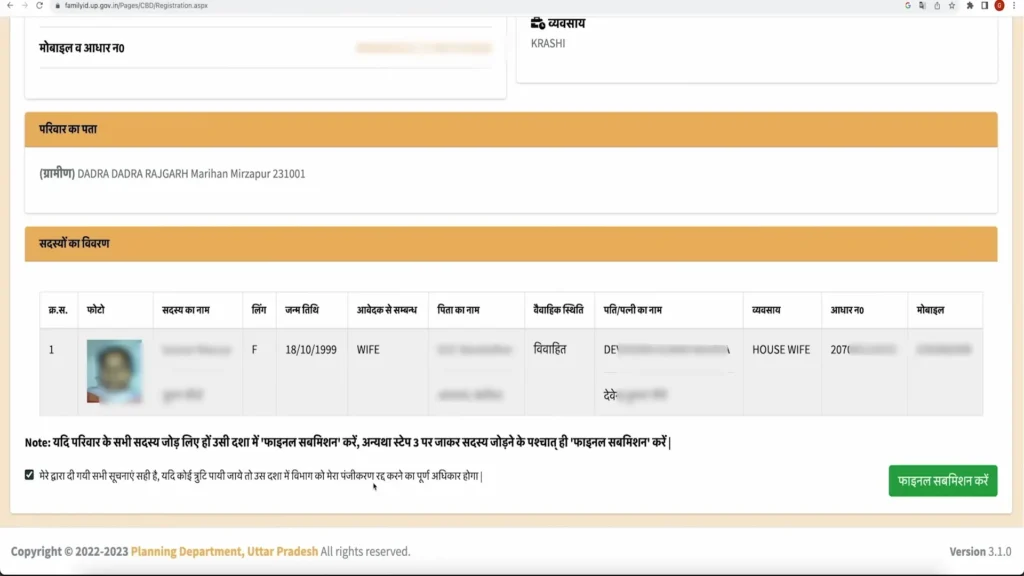
Review and Confirm: Double-check all the information provided for accuracy.
Submit the Application: Click the submit button to complete the registration process.
Get Your Reference Number: After submission, a reference number will be generated. Keep this safe for tracking your application status.
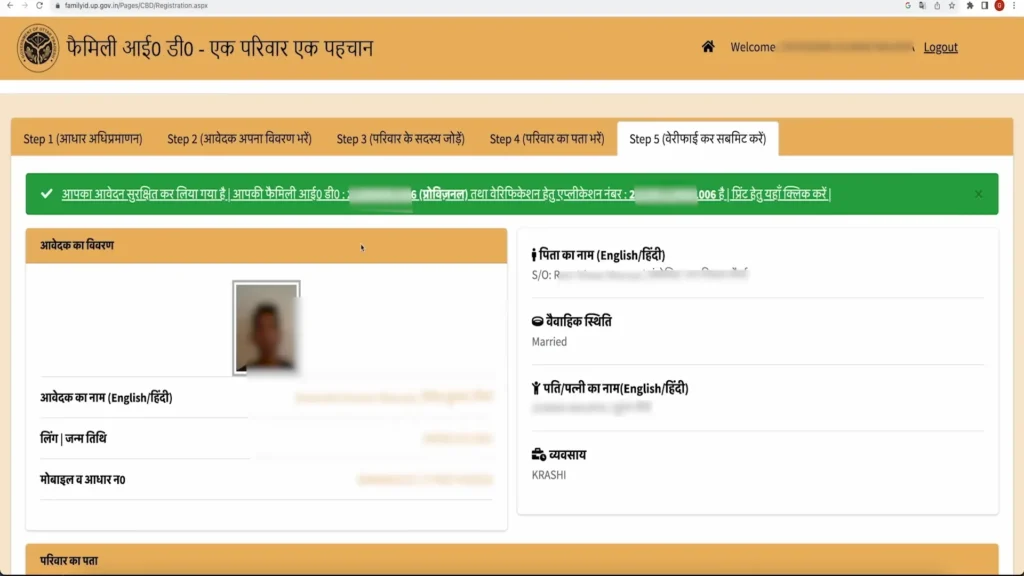
Offline Registration through CSC Centers
Important Tips for Registration
Ensure Correct Details: Verify your information, especially family members’ details, to avoid issues later.
Check Document Validity: Make sure all documents are up to date, such as Aadhaar cards, proof of residence, and income certificates.
Active Mobile Number: Ensure the mobile number you provide is active as OTPs are sent for verification.
Secure Your Information: Only use the official UP Family ID portal and be cautious when sharing personal details.
Track Your Application: Keep your reference number safe, as it helps in tracking your application status.
How to Login to UP Family ID Portal?
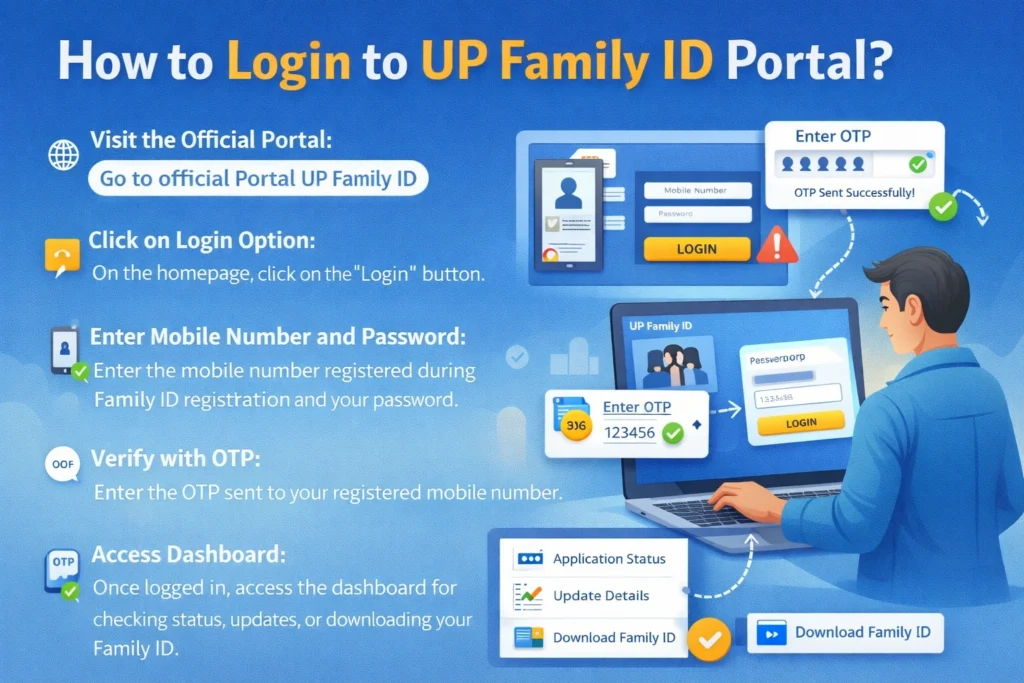
To access all services on the UP Family ID portal, logging in is required. Here’s how you can do it:
Go to official Portal UP Family ID
On the homepage, click on the “Login” button.
You will need to enter the mobile number that was registered during the Family ID registration process. Then, input your password. If you are a new user, make sure to set your password.
Enter the OTP sent to your registered mobile number.
Once logged in, you can access the dashboard and perform actions such as checking application status, updating details, or downloading your Family ID.
How to Track UP Family ID Application Status
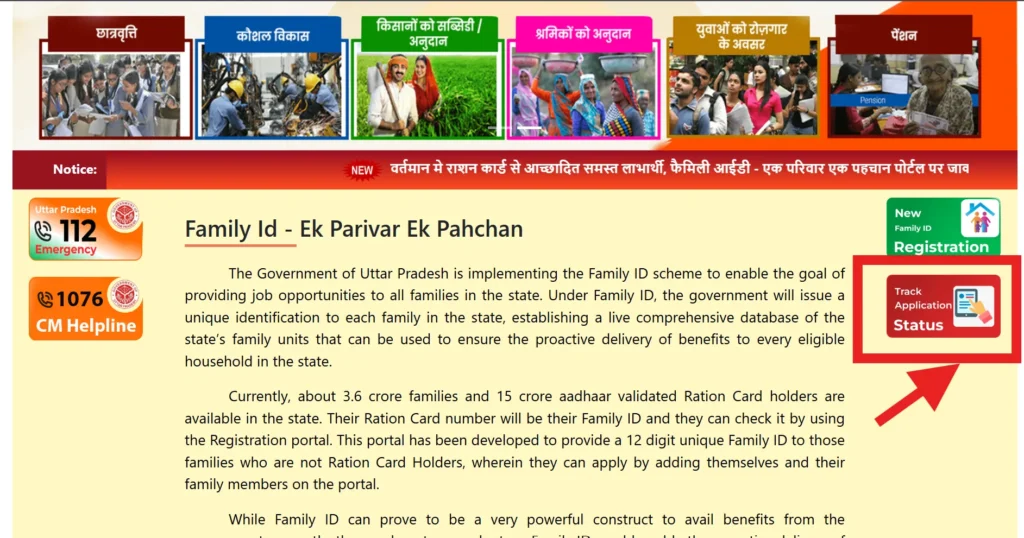
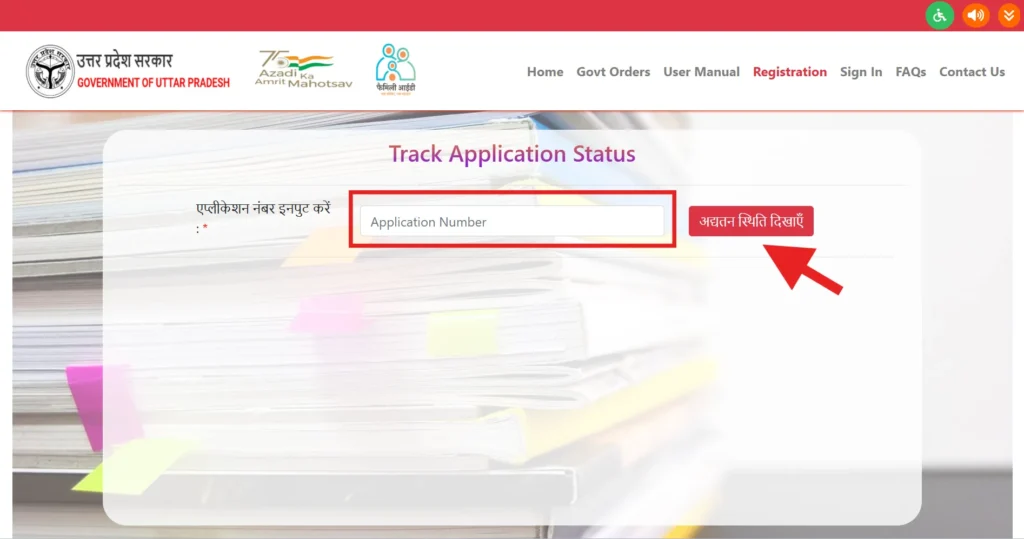
To track the status of your UP Family ID application, follow these steps:
Visit the Official Portal: Go to official UP Family ID website and navigate to the “Track Application” section.
Enter Reference/Application Number: You will need to enter your reference number or application number (received during registration).
Enter Required Details: Additionally, you may be asked to input other details such as your mobile number or date of birth.
View Status: The system will display the current status of your application, which can be one of the following:
1.Approved: If approved, you can proceed to download your UP Family ID.
2.Pending Verification: The application is under review. This may require some additional processing.
3.Rejected: If the application was rejected, the reason for rejection will be displayed.
4.In Process: The application is still being processed, and no final decision has been made.
What to Do If Your Status is “Rejected”
How to Download UP Family ID
Once approved, download your Family ID:
How to Update or Correct Family ID Details
Updating or correcting your Family ID details is essential in case of any changes in your family structure or personal information. Here’s how to do it:
Use your registered mobile number and password to log in to the UP Family ID portal.
Navigate to the “Update Family Details” section on the dashboard.
- Add New Member: For adding newborns, spouses, or any new family member.
- Remove Member: For removing a deceased member.
- Update Personal Details: For correcting names, income, or educational qualifications.
- Update Address: If you have moved to a new address.
Upload the required documents, such as birth certificates, death certificates, or proof of residence.
Review your updates and submit the request. OTP verification will be required.
Use the reference number to track the status of your update request.
Benefits of UP Family ID
Simplified Access to Government Schemes:
The Family ID system eliminates the need for multiple applications, streamlining the process of receiving benefits such as subsidies, pensions, and other government services.
Faster Delivery of Welfare Schemes: With a centralized database, eligible families receive government benefits promptly, helping families improve their quality of life without unnecessary delays.
Prevents Fraud and Redundant Claims: The system ensures that only eligible households receive government support, reducing fraudulent claims and ensuring fairness.
Common Issues and Troubleshooting with UP Family ID
How UP Family ID Helps in Direct Benefit Transfers (DBT)
Linking Family ID with DBT for Seamless Transfers: UP Family ID allows direct deposit of welfare funds into the bank accounts of eligible families, eliminating delays caused by intermediaries.
How DBT Improves Transparency in Welfare Schemes: DBT ensures that the intended recipients receive the benefits directly into their bank accounts, reducing corruption and ensuring fairness.
UP Family ID for Government Employees
Government employees can link their Family ID to avail various schemes, including housing, educational subsidies, and medical benefits.
Certain welfare schemes specifically designed for government employees can be accessed more easily through the UP Family ID.
Tracking Family ID for Multiple Family Members
UP Family ID vs Other State Systems: A Comparison
The UP Family ID and Haryana PPP Family ID both provide unique IDs for households to access government welfare schemes. UP offers strong digital access with a dedicated app and online portal, enabling easy registration and PDF downloads, while Haryana relies mainly on its official web portal, with limited mobile support. Both systems prevent duplication, ensure transparency, and streamline benefits, but UP focuses more on digital convenience, whereas Haryana emphasizes comprehensive family data integration.
Security and Data Privacy
Use Only Official Websites: Always access the official UP Family ID portal. Do not provide personal details on websites that are not authorized by the government.
Keep Your Credentials Safe: Never share your password or OTP with anyone, including government agents. Only provide such information on the official website.
How to Reset Your UP Family ID Password: If you forget your password, you can easily reset it by clicking the “Forgot Password” option and receiving an OTP on your registered mobile number.
UP Family ID for Rural Families: A Game Changer
Why Rural Families Benefit from UP Family ID: UP Family ID has a significant impact on rural households by simplifying access to essential government services, ensuring these families are not left out.
Accessing Subsidies and Benefits for Farmers: Farmers and agricultural workers can access schemes such as fertilizer subsidies, housing support, and health insurance under the UP Family ID initiative.
Future Plans for UP Family ID Expansion
Important Links
| Purpose | Link |
|---|---|
| Official Website | https://familyid.up.gov.in/portal/index.html |
| UP CSC Portal | https://upcsc.in |
| UP Jan Seva Portal | https://jansunwai.up.nic.in |
| UP e-District | https://edistrict.up.gov.in |
Frequently Asked Questions
Conclusion
The UP Family ID system is a game-changer in ensuring smooth, transparent, and efficient delivery of government welfare schemes. By consolidating family data into a single, secure platform, it removes redundancy and enhances the accessibility of vital services. Ensure that you complete your registration correctly and keep your Family ID details up to date to benefit from the government’s welfare programs.


