
How to Reactivate Deactivated Family ID in Haryana in 2026!
If your PPP Family ID in Haryana has been deactivated by mistake, don’t worry — you’re not alone. Many people face this issue due to system glitches, data mismatches, or pending updates on the portal. The good news is that you can easily Reactivate Deactivated Family ID by following the correct process and submitting the required documents.
This guide explains everything in a simple way so you can fix the problem quickly and smoothly.
What Is a PPP Family ID and Why It Matters
The PPP Family ID is an 8‑digit unique number given to every family in Haryana by the government. It helps you access many benefits such as welfare schemes, subsidies, pensions, and ration cards without filling paperwork again and again. It’s basically your family’s digital identity for government services.
When it gets deactivated, you might be blocked from using important services. So it’s important to fix it as soon as possible.
Common Reasons Why PPP Family ID Gets Deactivated
Here are some usual reasons why your Family ID might get deactivated:
Sometimes the portal shows glitches and marks IDs inactive by mistake.
If the details (like name, Aadhaar, mobile number) don’t match the records, the system can deactivate the ID.
If you recently updated your family details and the update is still under verification, it may show as deactivated.
These are the most common situations — and most of the time, it’s not permanent. And Also You can Fetch PPP Family ID Using Aadhaar – Learn the detailed method to quickly retrieve your PPP Family ID with your Aadhaar number.
How to Confirm Your Family ID Is Truly Deactivated
Before you take action, check your Family ID status like this:
Visit the official Parivar Pehchan Patra login page and log in using your Family ID or Aadhaar details.
If it shows your ID as “Inactive” or “Deactivated,” then you need to reactivate it.
Make sure you take a screenshot or note the exact message because this will help when you contact support.
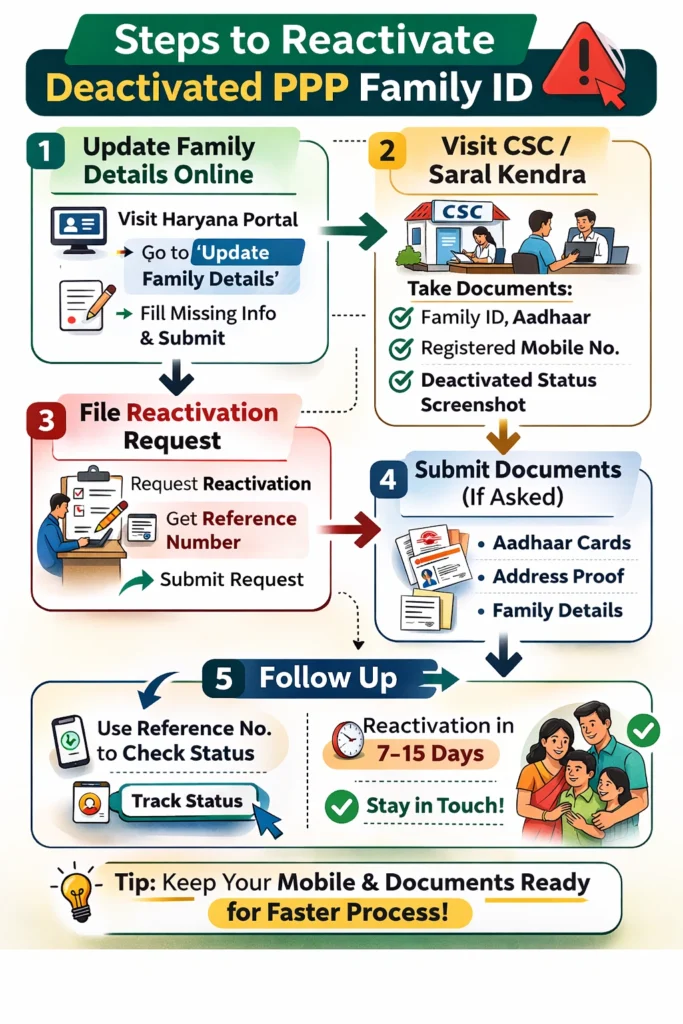
Step‑by‑Step Way to Reactivate Deactivated Family ID
Follow these steps to get your Reactivate Deactivated Family ID:
Try Updating Your Family Details Online
Sometimes the deactivation happens because of incomplete family details. You can update them yourself:
Go to the PPP Family ID update section on the official Haryana portal or try the “Update Family Details” option and follow the steps.
isit Your Nearest Common Service Centre (CSC)
If online update doesn’t fix it, go to a nearby CSC or Saral Kendra with:
1.Your Family ID number
2.Aadhaar card
3.Mobile number linked with your PPP ID
4.Screenshot of the deactivated status
At the CSC, the operator can verify your details and start the reactivation process.
File an Appeal for Reactivation
At the service centre, ask the staff to lodge a reactivation request for your deactivated Family ID. They will submit your request to the backend team.
Make sure you get a reference number for this request so you can track the progress later.
Give Any Required Documents
Sometimes officials might ask you to submit documents to verify your details — like Aadhaar, proof of address, or proof of family members. Provide accurate copies to speed up the process.
Follow Up Regularly
Reactivation can take a few days to a couple of weeks. Use the reference number to check status again with the centre or online.
Stay patient but follow up so your request doesn’t get missed.
Tips to Prevent Deactivation in Future
Here are some simple tips to avoid this problem:
These small steps help reduce chances of error or system confusion. And Fix Deactivated PPP Family ID Error – Follow simple instructions to recover and fix errors in your deactivated Family ID.
What Happens After Your Family ID Is Reactivated
Once your reactivation request is approved:
Quick FAQs
Final Thoughts
A deactivated PPP Family ID can be frustrating, but most of the time it’s just a small technical or data issue. The good thing is that you can Reactivate Deactivated Family ID by confirming your status, updating your details, visiting a service centre, and following up properly.
Once it’s reactivated, all your government service access will return to normal. Just stay patient and follow the steps carefully — in most cases, the process to Reactivate Deactivated Family ID is smooth and straightforward.


