
UP Family ID Reset Password: Easy Step-by-Step Guide 2026!
UP Family ID, also called “Ek Parivar Ek Pehchan,” is an online identity system for families in Uttar Pradesh. It helps the government connect families with welfare schemes, benefits, and services.
To use your account, you usually need your registered mobile number and password. But don’t worry if you forgot your password. You can reset it online in a few simple steps. UP Family ID Reset Password made easy! Learn how to reset your password using OTP, registered mobile number, and secure steps to regain portal access quickly. This guide explains the UP Family ID reset password process in easy language.
When Do You Need to Reset Your UP Family ID Password?
You may need to reset your password if:
You forgot your old password
Your password is not working
You changed your phone or browser
Someone else knows your password
You are unable to log in to your Family ID account
You see a login error again and again
Resetting the password helps you get back into your account safely.
Things You Need Before Resetting the Password
Keep these things ready before you start:
Tip: Use the same mobile number that you used while registering for UP Family ID. If the number is not active, OTP verification may fail.
How to Reset UP Family ID Password Online
Follow these steps carefully.
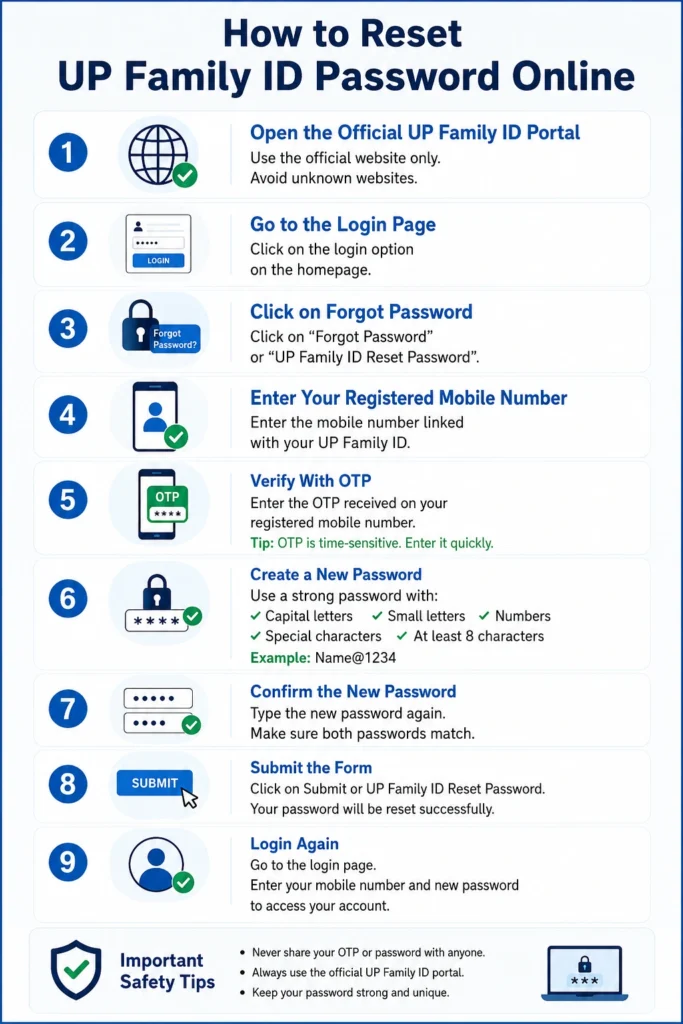
First, open the official UP Family ID portal in your mobile or computer browser.
Always use the official government website only. Avoid unknown websites because they may collect your personal details.
On the homepage, look for the login option. Click on it.
You will see a login form where users enter their mobile number and password.
Below the login form, you should see an option like:
“Forgot Password”
or
“UP Family ID Reset Password”
Click on that option.
Now enter the mobile number linked with your UP Family ID account.
Check the number before submitting. A small typing mistake can stop you from receiving the OTP.
After submitting your mobile number, you will receive an OTP on your registered phone number.
Enter the OTP in the box shown on the screen.
Tip: OTP is time-sensitive. Enter it quickly. If it expires, use the resend OTP option.
Example format: Name@1234 type passwords are easy, but try not to use your real name or date of birth
Type the new password again in the confirm password box.
Make sure both passwords match exactly.
Click on Submit or UP Family ID Reset Password.
If everything is correct, your UP Family ID password will be reset successfully.
Now go back to the login page.
Enter your registered mobile number and new password. You should now be able to access your UP Family ID account.
What to Do If OTP Is Not Received?
Sometimes OTP may take a little time. Try these quick fixes:
If OTP still does not come, your registered mobile number may be wrong, inactive, or not linked properly.
What If You Forgot the Registered Mobile Number?
If you do not remember your registered mobile number, online reset may not work. In this case, you can visit your nearest Jan Seva Kendra or CSC center. Carry your identity proof and Family ID details if available.
They may help you check your account and guide you on the next step.
What If the New Password Is Not Working?
If your new password is not working, check these points:
Did you enter capital and small letters correctly?
Is Caps Lock on?
Did you add any extra space?
Are you using the latest password?
Did the password reset process complete successfully?
If you are still unable to login, reset the password again.
Safety Tips for UP Family ID Password
Your UP Family ID account may contain important family information. Keep it safe.
Follow these tips:
Never share your password with anyone
Do not share OTP with anyone
Do not enter your details on unknown websites
Avoid public computers for login
Always logout after using the portal
Use a different password from your social media accounts
Use a different password from your social media accounts
Important: Government staff or portal support should not ask for your password or OTP. If someone asks for it, do not share it.
Common UP Family ID Login Problems and Solutions
Reset your password using the forgot password option. Then login again with the new password.
Check network, wait a few minutes, and use resend OTP.
Try clearing browser cache, using another browser, or opening the portal later.
Use the mobile number entered during registration. If you do not know it, visit a Jan Seva Kendra.
Try again after some time. Make sure the OTP is correct and your new password follows the required format.
Quick Tips to UP Family ID Reset Password Without Trouble
Why You Should Use the Official Portal Only
Many people search for UP Family ID reset password and open the first website they see. This can be risky.
Your Family ID account may include Aadhaar-linked and family-related information. So always use the official government portal for login, password reset, status check, and updates.
Avoid websites that ask for extra personal details without reason.
FAQs on UP Family ID Reset Password
Conclusion
UP Family ID Reset Password is easy if your registered mobile number is active. Just open the official portal, go to the login page, click forgot password, verify OTP, and create a new password.
If OTP does not come or your mobile number is not active, visit your nearest Jan Seva Kendra for help. Keep your password safe, never share OTP, and always use the official portal.


