
Step-by-Step Process CSC Centers Use to Verify Family ID Doc
If you’re applying for a Haryana Family ID (like Haryana’s Parivar Pehchan Patra or a similar identity system), you can get assistance from a Common Service Centre (CSC). CSC centers are local government-linked offices assist with digital services, including Family ID registration, showing how CSC centers use to verify Family ID documents step by step.
This guide will explain how CSC centers use to verify Family ID documents step by step, what actually happens behind the scenes, and a few smart tips to make everything go smoothly.
What Is a CSC Centre?
A Common Service Centre (CSC) is a government‑approved centre where trained operators help local citizens access digital public services. They help with things like Aadhaar, government scheme registrations, certificates, and Family ID processes.
Think of a CSC as a one‑stop help point — especially useful if you’re not confident using the online portal on your own.
Why Document Verification Matters
When you apply for a Family ID, the PPP government needs to ensure the details you give are correct and authentic. That’s where document verification comes in. A CSC operator will check your documents carefully before submitting them to the state system.
This prevents mistakes, fraud, and helps you get your Family ID faster without status errors.
Step‑by‑Step: How CSC centers use to verify Family ID Documents
You Visit the CSC with Your Documents
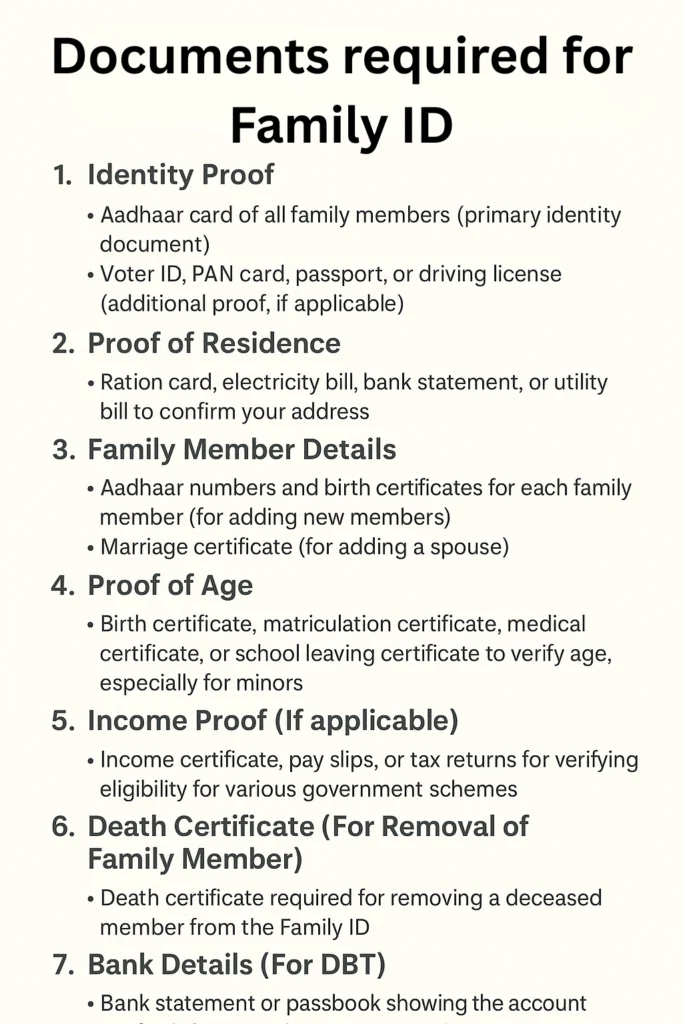
First, you go to the nearest Common Service Centre with original documents and copies. Typical documents needed include:
Aadhaar card (for all family members)
Proof of residence (like electricity bill)
Age proof (birth certificate, school records)
Voter ID (for adults)
Any other proof requested by the operator
The operator will ask you to show originals and give them copies for submission.
Tip: Carry clear, readable photocopies — blurry or damaged copies often slow down the process.
Operator Checks Each Document Carefully
Once you hand over your documents, the CSC operator will:
Match names with Aadhaar
Confirm dates of birth
Check that the address proof matches your current residence
Ensure adult family members have Voter IDs or appropriate proofs
This step ensures nothing is missing or mismatched before it goes into the official system.
Tip: Tell the operator if any details have changed (like a new address) — they can guide you on how CSC Centers Use to Verify Family ID and help with update steps too.
Operator Enters Your Data in the Portal
After checking, the CSC operator enters all your details into the Parivar Pehchan Patra system or the relevant state portal on your behalf. This is how CSC Centers Use to Verify Family ID, including filling in:
This is done carefully to avoid typos or mismatches, which often cause verification delays.
Documents Are Uploaded and Submitted
Once the details are entered:
Scanned copies of your documents are uploaded
The operator submits the form online
A temporary registration status is generated
At this point, your application moves to official verification with the government database.
Tip: Ask for the application reference number or receipt — you may need it later to track status.
Verification by Government System
After submission by the CSC:
The state system checks Aadhaar details
It verifies family relationships
It looks for consistency in age and address data
It confirms no duplicate or incorrect entries exist
This backend verification is automatic, but sometimes requires manual review if the system flags discrepancies.
Final Approval or Revision
Once the verification is complete:
If your details are correct, you get your Family ID in the portal and may be able to download it or collect a printed copy from the CSC.
Common Problems During Verification — And How to Avoid Them
If your mobile number isn’t linked to Aadhaar, OTPs may fail.
Smart Tip: Make sure your mobile is linked and active before you visit CSC.
If a document’s name doesn’t exactly match what you enter, the system may delay verification.
Smart Tip: Double‑check spellings and date of birth before submission.
Old or expired proofs can lead to extra questions.
Smart Tip: Use a recent utility bill or official rental agreement.
Useful Tips for a Smooth Verification at CSC
FAQs About CSC Document Verification
Final Thoughts
Getting your Family ID verified through a CSC can save you time and stress, especially when you’re not sure how to upload documents or fill forms online. Knowing how the process works step by step helps you stay prepared and avoid common mistakes. Understanding how CSC Centers Use to Verify Family ID ensures your documents are correct and your verification goes smoothly. If you follow these simple steps and tips, your Family ID verification should go smoothly and help you access the benefits you’re eligible for without any hassle.


