
PPP Family ID: Which Documents Are Auto-Fetched? Full List
If you’ve heard about the PPP Family ID (Parivar Pehchan Patra) and wondered what Documents Are Auto-Fetched or information the government actually pulls automatically when you use it, you’re in the right place.
This article will explain it in easy language, just like I’m talking to a friend, and give you useful tips to make the PPP process smoother.
What Is PPP (Parivar Pehchan Patra)?
The PPP system is a digital family database created by the Haryana government. Each family gets a unique 8‑digit Family ID that stores important information like income, family members, address, caste, and more. This database is used by multiple departments so citizens don’t have to submit the same documents again and again for government services.
What “Documents Are Auto-Fetched” Really Means in the PPP System
When we say “Documents Are Auto-Fetched,” it doesn’t mean the system literally downloads your physical papers. Instead, it automatically fills in your details using the data already stored in the PPP database when you apply for certain services.
This saves time, reduces paperwork, and helps avoid repeated uploads of the same documents. The PPP system uses pre‑verified data so government portals can read and use it automatically.
Benefits of Auto-Fetching Documents
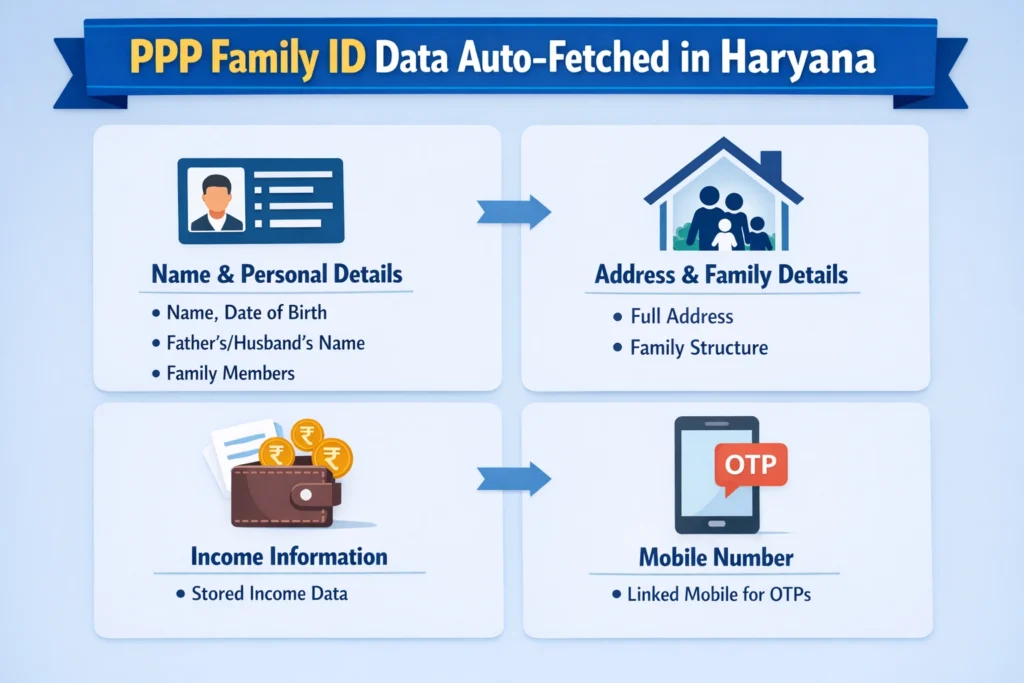
The PPP system automatically fetches the following details:
Name and Personal Details: Basic personal information like name, date of birth, father’s or husband’s name, and family member names.
Address and Family Structure: Complete address and household details.
Income Information: Automatically fetches your income details for income-based certificates, like EWS.
Mobile Number: The mobile number linked to your PPP ID for OTP and verification.
Auto-fetching eliminates the need to upload these documents repeatedly, saving time and reducing errors.
Step-by-Step Guide: Using PPP Family ID for Applications
Ensure your details are accurate.
Choose the desired service you are applying for.
The system will automatically retrieve your verified information.
After confirmation of auto-fetched details, submit your application.
Documents Are Auto-Fetched and Data;
Here’s what the system can automatically pull when you use your PPP Family ID:
Name and Personal Details
The system fetches basic personal information such as:
1.Your name
2.Date of birth
3.Father’s or husband’s name
4.Family member names
These are already saved in the PPP database.
Address and Family Structure
Your complete address and household details are auto‑retrieved from PPP when required by a service provider.
Income Information
Your income information stored in the PPP database can be fetched automatically when you apply for schemes or certificates where income matters, like EWS or income certificates.
Mobile Number
The mobile number linked to your PPP ID is used to send OTPs and verify your details on portals without uploading proof again.
These details help government applications avoid asking for repeated document uploads, as they are already part of the verified PPP record.
Where Auto‑Fetched Data Is Most Useful
Government services use PPP Documents Are Auto-Fetched or data in many places, such as:
Education portals (for admission registrations)
Welfare and pension schemes
Income or caste certificates
Public distribution services
Job or employment registrations
For example, when you sign up for technical admissions in Haryana, your PPP Family ID automatically pulls things like your name, gender, date of birth, and income from the PPP database without you having to upload those certificates again. And Find out how your PPP Family ID affects eligibility for EWS certificates in Haryana.
Why Auto‑Fetching Matters
The idea is to make life easier for citizens. Instead of uploading the same document every time:
The PPP database acts as a single source of truth for basic identity and family information that the government can trust.
Common Issues or Errors
While using PPP Family ID and auto-fetching documents, you may encounter the following issues:
Mismatched Information: If the details in the PPP database are outdated, the auto-fetching may not work correctly.
Mobile Number Issues: Ensure that your mobile number is up to date, as OTPs are sent for verification.
Wrong Document Retrieval: Occasionally, the wrong data might be fetched if the PPP database has errors.
Make sure to check and update your PPP details before applying for any services.
Important Tips Before Applying for Any Service with PPP
Before you apply for anything online, log in and make sure your PPP details are accurate. If your name, date of birth, or income are wrong, the auto‑fetch might also be wrong.
If something has changed — like income, address, or family members — update the PPP database before applying for EWS. Mismatched data is one of the most common reasons for rejection.
Always use a working mobile number with PPP because most portals send OTPs to that number to verify your identity.
Frequently Asked Questions (FAQs)
Final thoughts
The PPP system is designed to reduce paperwork and make it easier for families in Haryana to apply for certificates and government services. When the portal Documents Are Auto-Fetched from PPP, it simply retrieves already verified records such as identity, family details, and income information stored in the PPP database—saving time and avoiding repeated document uploads.
This makes applications faster, less error‑prone, and much simpler for you. Just make sure your PPP details are accurate and updated before applying for any service.


