
UP Family ID Correction:How to Update Your Family ID Details
UP Family ID (Parivar Pehchan Patra) is a unique ID system used by the Government of Uttar Pradesh to link family details with welfare schemes and services. As life changes — like new births, marriage, address change, or correcting mistakes — you may need to update these details. Fortunately, you can do this online through the official portal.
This guide tells you exactly how to make UP Family ID Corrections or updates in your UP Family ID in a simple, friendly way. Learn how to complete UP Family ID Correction online & update your details easily. Follow step-by-step guidance, avoid common mistakes and get faster approval.
Why You Might Need to Update Your UP Family ID
Here are some common reasons people update their family ID:
To correct a spelling mistake in a name
To update date of birth
To change address
To add newly married spouse
To add a newborn child
To remove someone due to death or moving away
To change registered mobile number or bank details
It’s important to keep your Family ID accurate so you can get benefits and avoid verification problems later.
What You Need Before Starting
Before you start the UP Family ID Correction or update process, make sure you have:
Tip: Keep clear scans or good photos of your documents. Blurry files can delay approval.
How to Correct or Update Your Details (Step‑by‑Step)
Follow these easy steps to update your Family ID details online:
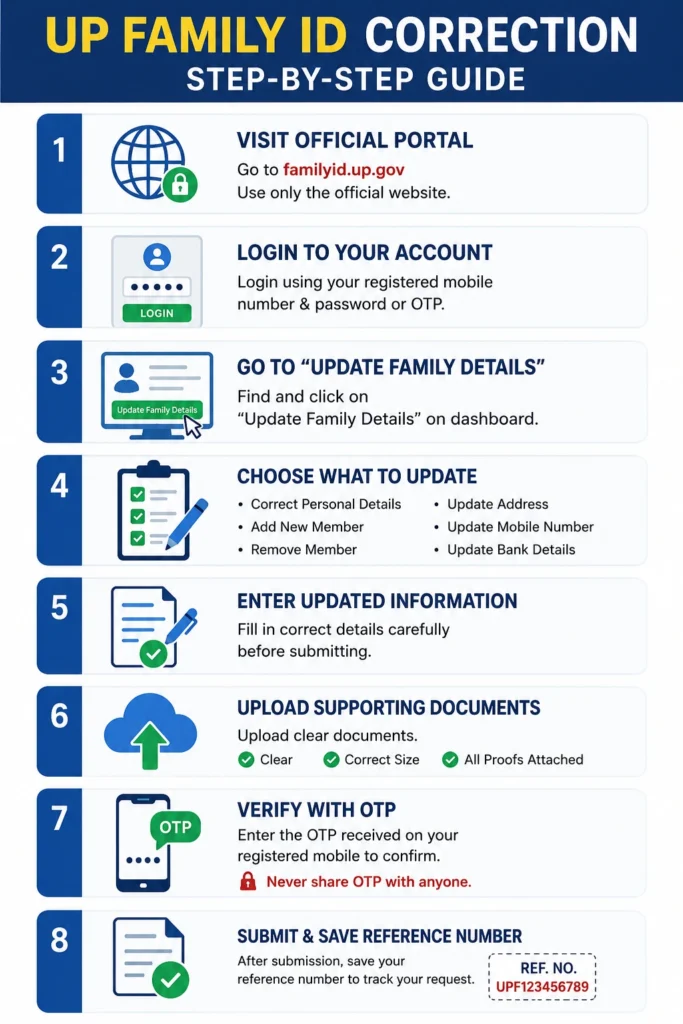
Open the Official Portal
Visit the official UP Family ID portal at familyid.up.gov. Make sure you are on the real government site only. Fake sites can steal your info.
Login to Your Account
Use your registered mobile number and password or OTP to log in.
If you forgot your password, use the Forgot Password option and reset it before you continue.
Go to “Update Family Details”
After login, find the section called Update Family Details on your dashboard.
Step 4: Choose What You Want to Update
Depending on what needs correction, choose one of the following:
1.Correct Personal Details (name, DOB, education, etc.)
2.Add New Member (baby, spouse, parent)
3.Remove Member (death, migration)
4.Update Address
5.Update Mobile Number
6.Update Bank Details
Enter Updated Information
Fill in the correct details carefully. Make sure everything is accurate before submitting.
Upload Supporting Documents
Upload the documents that support your update request. Always check:
1.Document is clear and readable
2.File meets the size requirements
3.All necessary proofs are attached
Verify With OTP
You’ll get a one‑time password (OTP) on your registered phone. Enter it to confirm your request. Never share this OTP with anyone.
Submit and Save Reference Number
Once submitted, you’ll see a reference number. Save it to track your update request later.
How to Track Your Update Request
After submission, you can track the status online:
Go to the official portal
Click Track Application
Enter your reference number or registered mobile number
Submit and check status
Status may show:
If it’s rejected, check the reason and correct any mistakes before submitting again.
Common Problems and Fixes
Here’s how to avoid mistakes that can delay or reject your update:
Use exact spelling as in Aadhaar or birth certificate
Upload clear documents (no blurry photos)
Don’t leave required fields blank
Use your registered mobile number
If OTP isn’t coming, check your network or use Resend OTP
Careful steps reduce problems later.
What to Do If the Option Doesn’t Show
Sometimes the update option may not appear, especially for certain UP Family ID Corrections. If that happens:
People often find this solves issues that can’t be fixed online.
Safety Tips When Updating Your Family ID
Your Family ID contains personal family information. Keep it safe:
Always use the official portal
Never share OTP or password with anyone
Avoid public or shared computers
Log out once done
Keep a backup of documents you upload
No official should ever ask for your OTP or password.
Quick Tips Before You Submit
Frequently Asked Questions About UP Family ID Correction
Final thoughts
Keeping your UP Family ID updated is important so your family gets the benefits they deserve without delays. The online UP Family ID Correction process is simple if you follow the steps carefully and upload clear supporting documents.
Taking a little time now can save a lot of hassle later. Always keep your documents ready, enter accurate information, and track your request till it’s approved.


