
Family ID Haryana: Verify Identity for Online School Exams
Today, as more schools use online exams for tests and assessments, the need to verify identity for online school exams has become essential for all students. While schools in Haryana increasingly use systems like the Apaar ID for board exams, understanding how digital identity documents like Haryana Family ID (Parivar Pehchan Patra) can support to Verify Identity for Online School Exams is useful for students, parents, and school administrators alike.
What Is Family ID? (Quick Recap)
Family ID (Parivar Pehchan Patra) is a unique 8‑digit number issued by the Haryana government that stores verified family details in one digital database. It connects basic identity information like family members, Aadhaar linkage, address, and socio‑economic details into a single identity record.
Can Family ID Be Used for Verify Identity for Online School Exams?
Yes — in Supportive Ways, Here’s how Family ID can help if a school or platform needs secure identity verification online:
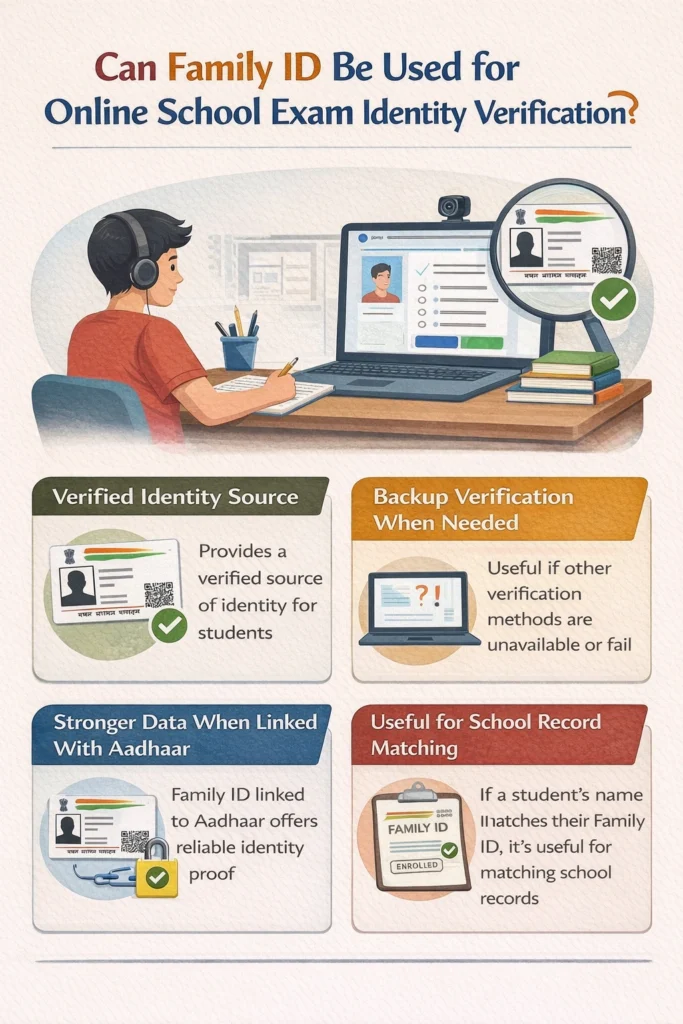
Family ID offers government‑verified identity data. If a school system integrates it, the data can confirm that the student is who they claim to be before starting an online exam.
Some platforms ask for official IDs when students face trouble with their regular student login. Family ID could be used as a backup form of verification when allowed by the school.
Since Family ID uses Aadhaar‑linked mobile verification, it adds another level of security. If a system verifies identity through Aadhaar‑linked Family ID, it becomes harder for impersonation or fraud.
If a student’s name, address and Aadhaar linked Family ID match school records, it makes online checks easy and trusted.
Step-by-Step Guide to Use Family ID for Online Exam Verification
Confirm School Acceptance
Check with your school whether Family ID can be used alongside other exam-specific IDs.
Update Family ID Details
Make sure all names, Aadhaar-linked mobile numbers, and addresses are correct in your Family ID profile.
Keep Digital and Physical Copies Ready
Save a PDF on your phone or email and print a hard copy if needed.
Use OTP Verification When Required
If the platform sends an OTP to your Aadhaar-linked mobile, ensure the number is active and accessible.
Submit Family ID as Supporting Verification
Family ID is usually a backup or supplementary ID unless the exam portal explicitly accepts it as primary proof.
Eligibility – Who Can Use Family ID for Online Exams
Single-person households or students from minor family units can also use their Family ID if the school permits it.
Required Documents Alongside Family ID for Exam Verification
Aadhaar card (linked to Family ID)
School-issued ID (roll number, Apaar ID, or student card)
Digital copy of Family ID (PDF)
Printed copy of Family ID if requested by the school
Having these documents ready ensures smooth verification during online exams.
How to Download Haryana Family ID (PPP) for Exam Verification
To use the Haryana Family ID (Parivar Pehchan Patra) for online exam verification, you first need to download it from the Haryana government portal. Here’s a step-by-step guide to help you download your Family ID:
Visit the Official Haryana Family ID Website
Go to the Haryana Parivar Pehchan Patra website [insert link here] where the Family ID services are hosted.
Login to Your Account
Enter your credentials, such as your registered mobile number (linked to Aadhaar) and password, to access your Family ID account.
Search for Your Family ID
Once logged in, locate the “Family ID” section. You may need to enter details like the family head’s name, Aadhaar number, or family address to search for your record.
Download Your Family ID
After finding your record, look for the download option. The Family ID will be available as a PDF file. Click on the “Download” button to save it to your device.
Save and Store the File
Once downloaded, save a copy of your Family ID PDF on your phone, email, or cloud storage for easy access. You can print it out if needed.
Troubleshooting Common Issues During Online Exam Verification
Tip: Always keep Family ID details updated to prevent verification delays or failures.
Why Family ID Offers More Security and Efficiency
Real-time Verification: Instant online verification reduces waiting times
Reduced Fraud: Aadhaar-linked Family ID prevents impersonation or identity fraud
Convenience: Once verified, Family ID can be reused across multiple exams and government services
When Family ID Might Not Be Enough Alone
It’s important to be clear:
So Family ID helps mainly when the school or platform allows or needs additional identity verification. Family ID can assist in accessing legal aid and court-related services efficiently in 2026.
Practical Tips for Students and Parents
Here are easy, helpful tips to make sure your Family ID can support Verify Identity for Online School Exams needs:
Why Family ID Offers More Security and Efficiency for Online Exam Verification
Unlike traditional identity methods, which often rely on paper documents or manual verification, Family ID leverages a government‑linked, digital platform that ensures faster, more secure verification. This means students and schools benefit from less paperwork and more accurate identity checks. Here’s why using Family ID can stand out:
Common Questions (FAQs)
Final Thoughts
Today’s education system is moving fast toward online learning and exams. While tools like Haryana, Apaar ID are being officially introduced for board exams in Haryana, Family ID can still play a helpful role in identity verification — especially for internal or school‑based online assessments.
Think of Family ID like a Verify Identity for Online School Exams that supports who you are. When paired with school IDs or Aadhaar verification steps, it can help make online exam authentication easier, smoother, and more secure.


