
Family ID–Welfare Schemes: Is a Separate Application Needed?
If your family has a Haryana Family ID under the Parivar Pehchan Patra (PPP) scheme (or similar family-ID initiatives in other states), you might wonder: “Will all my welfare benefits be automatically provided, or do I still need to apply for them?” That’s a great question. Let’s break down how the system works, what benefits are automatic, and what actions you should still take for specific welfare schemes.
What exactly is “linkage” between Family ID and welfare schemes?
In simple terms: your PPP Haryana acts like a master record for your family — it stores details like who’s in your family, income, bank account, Aadhaar, address, births, deaths, etc. Government departments use this same Family ID to check whether your family qualifies for various welfare schemes (old-age pension, subsidies, scholarships, etc.). They use this database to automatically update eligibility for many welfare services.
Which Welfare Schemes Are Linked With Family ID?
Many government welfare schemes in Haryana may use Family ID data for eligibility checks and verification. These can include social security pensions, scholarships, subsidies, financial assistance programs, and other department-based welfare benefits.
Examples may include:
The exact list can change depending on government updates and department rules. Some schemes may be fully linked with PPP, while others may only use Family ID for verification and still ask for a separate application.
How automatic is it really?
Good news: Quite a lot is automatic, but there’s a catch.
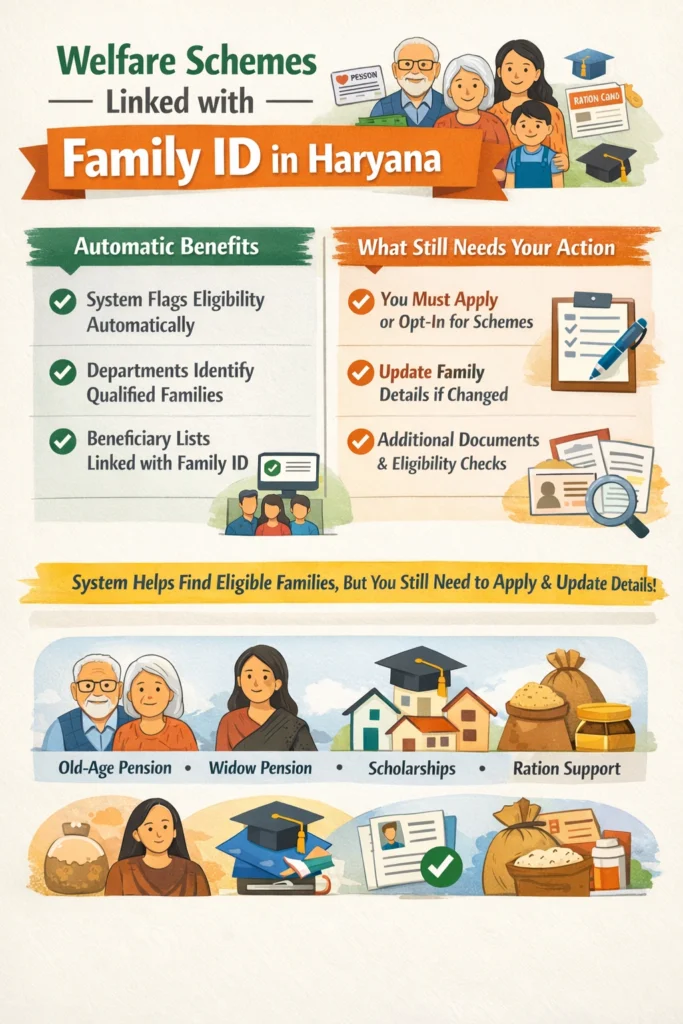
What is automatic:
Once you have the Family ID registered and verified, the system flags you as eligible (or not) for different schemes because your data is already in the system.
For example, when Welfare schemes is launched, the departments can pull the Family ID database and identify families who match criteria and may not need a fresh full application.
Many welfare departments link their beneficiary lists with the Family ID number, making the verification smoother.
What is not fully automatic (so you still need to act):
You still often need to apply or at least opt in for a scheme (e.g., you may need to fill a short form saying “I want to avail this pension”).
If your Family ID data hasn’t been updated (say you moved, someone died, income changed) you might not get automatic benefit.
Some Welfare schemes have additional eligibility checks (special criteria, documentation) beyond the Family ID database.
Your benefit might require application because budgets, quotas, priority lists still need your request.
In short: Family ID reduces the paperwork and speeds up eligibility, but — as common problems show — it does not always guarantee “no application ever.”
Why this linkage is helpful
How to Apply for Welfare Schemes Using Family ID
Make sure your Family ID is active and verified
Check the official portal or the concerned department’s website for the scheme
Enter your Family ID number where required
Fill out a separate form if the scheme asks for one
Upload or submit the required documents
Save the acknowledgement or reference number after submission
Regularly check SMS alerts, portal updates, or application status
How to Update or Correct Information in Your Family ID
First, review all your Family ID details carefully
Update any incorrect information such as income, address, bank account, or family member details
Correct details if there has been a change in name, birth, death, marriage, or mobile number
Submit the correction request through the official PPP portal or an authorized center
Attach supporting documents wherever required
Track the update status after submission
Confirm that all details are correct before applying for any welfare scheme
What you should check and do (so you don’t miss out)
Family ID is active and verified in your state portal.
(income, family members, bank account, address) are correct in your Family ID. If something changed, update it.
you’re eligible for, don’t assume you’ll be covered automatically—check if there’s a short application or update you need to do.
your SMS or portal notifications: Sometimes the department might send you a message saying “you’ve been auto‑selected” or “please complete form”.
but weren’t selected, check your data and ask the department if your Family ID data was used or missed.
your Family ID number and any application submissions so you can follow up if needed.
FAQs
Final thoughts
Your Family ID is like your family’s key in the welfare system — it opens doors and simplifies things. But you still need to keep the key sharp (i.e., keep your data updated) and sometimes use it yourself (apply for the welfare scheme). It doesn’t always mean “sit back and everything comes automatically,” but it definitely gets you closer to that.


